Start
The landing page (Start) of the SPM Cockpit provides navigation through the collaboration pattern detection process. Therefore, each step has a step card, which provides the functionalities for the respective step. Depending on the state of the process, buttons may be hidden or disabled.
Step cards
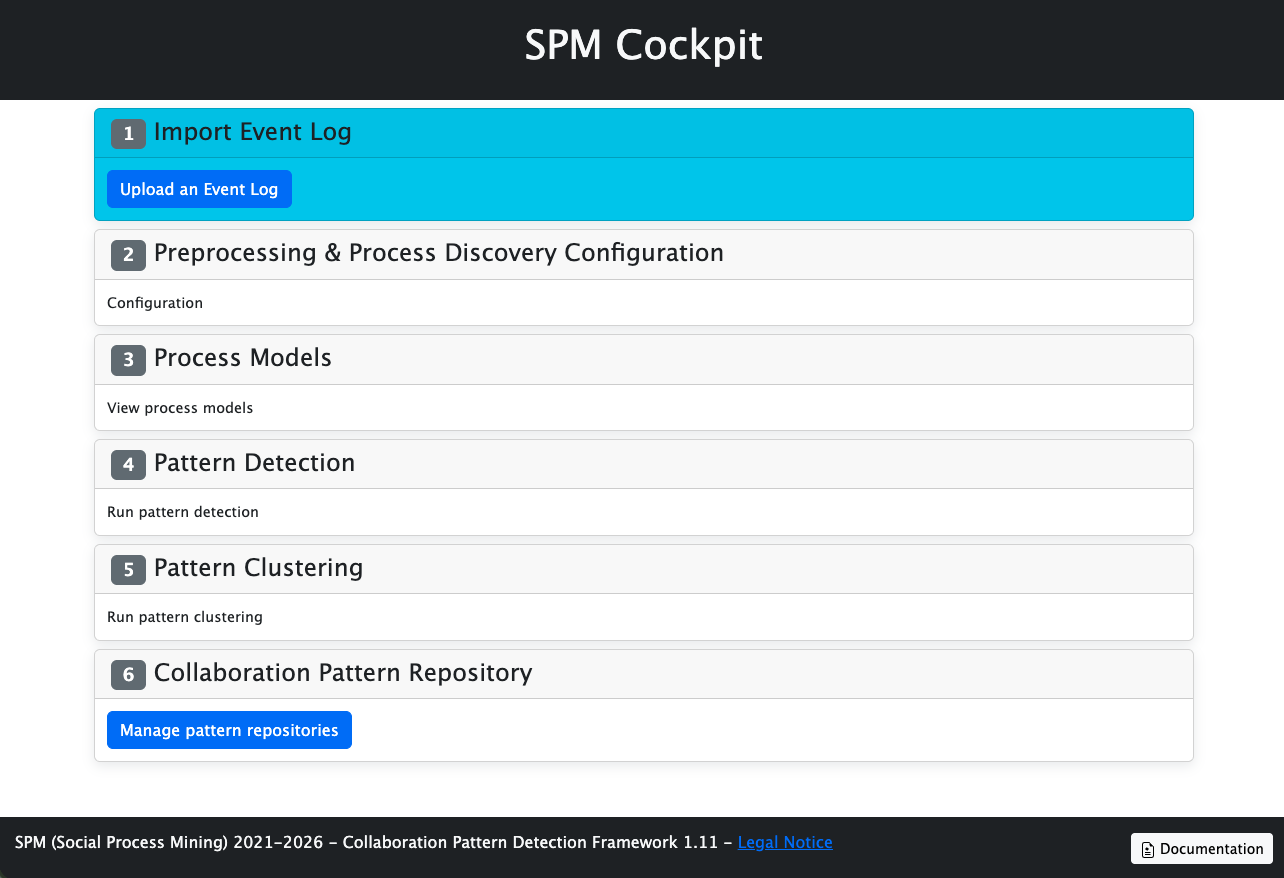
Steps
The six steps are:
- Import Event Log - To provide the necessary input data, upload an
XESevent log. - Preprocessing and Process Discovery Configuration - Define the configuration to specify what the process model instances should look like.
- Process Models - View the visualizations of the mined process instance models.
- Pattern Detection - Define how the patterns should be discovered.
- Pattern Clustering - Define how the patterns should be clustered.
- Collaboration Pattern Repository - View, upload, or download the collaboration patterns.
Color codes
The step cards are highlighted based on the state of the respective step. Therefore, the colors of the step cards indicate the status:
- Blue background / Gray number icon: Current Step
- Gray background / Green number icon: Step completed
- Gray background / Gray number icon: Future step*
*It is always possible to manage the Collaboration Pattern Repository
Navigation
The buttons within the step cards link to sub-pages of the related step.
On all sub-pages, a Start button in the top left corner can be clicked to navigate back to the landing page.
Gray buttons provide further information about the named action.